


Domain Names, Name Servers, and DNS Zone Files: A Plain-English Guide for Business Owners
You bought a domain name — so why isn’t your website live? You switched web hosts, and suddenly email stopped arriving. Your old developer disappeared, and now nobody knows where the domain even lives.
After more than two decades of building and managing websites, we can tell you the most stressful problems our clients face are rarely about design. They’re about the plumbing underneath: domains, registration, name servers, and DNS. And nearly every one of those crises is preventable once you understand four concepts.
This guide explains all four in plain English, using a single analogy: your website is a business in a very large city.
The Analogy: A Business in a Very Large City
Keep this mental model in mind and everything below will click into place.
Think of the internet as a sprawling city with billions of buildings. Every building has a precise street address — in internet terms, an IP address, a string of numbers like `203.0.113.42`. Computers navigate by these numbers. People don’t.
So the city runs an enormous directory service. Customers look up a business by name, and the directory translates that name into a street address they can actually drive to. That directory service is DNS — the Domain Name System — and every piece of it maps to something in your business:
| On the Internet | In the City |
|---|---|
| IP address | A building’s street address |
| Web hosting server | The building where your business operates |
| Domain name | Your business name — what customers look up |
| Domain registration | Your exclusive lease on that name |
| Registrar (GoDaddy, Namecheap, etc.) | The leasing agent you deal with |
| Registry (e.g., Verisign for .com) | The county records office holding the master books |
| Name servers | The directory office assigned to answer for your name |
| DNS zone file | The page of listings that office keeps for you |
One line worth memorizing: your domain name is not your website. The name is the listing; the website is the building. You can keep the same name for decades while moving buildings (changing hosts) many times — you update the directory. Once clients understand this one distinction, most domain confusion disappears.
Now let’s walk through each piece.
1. Domain Names: The Name Customers Look Up
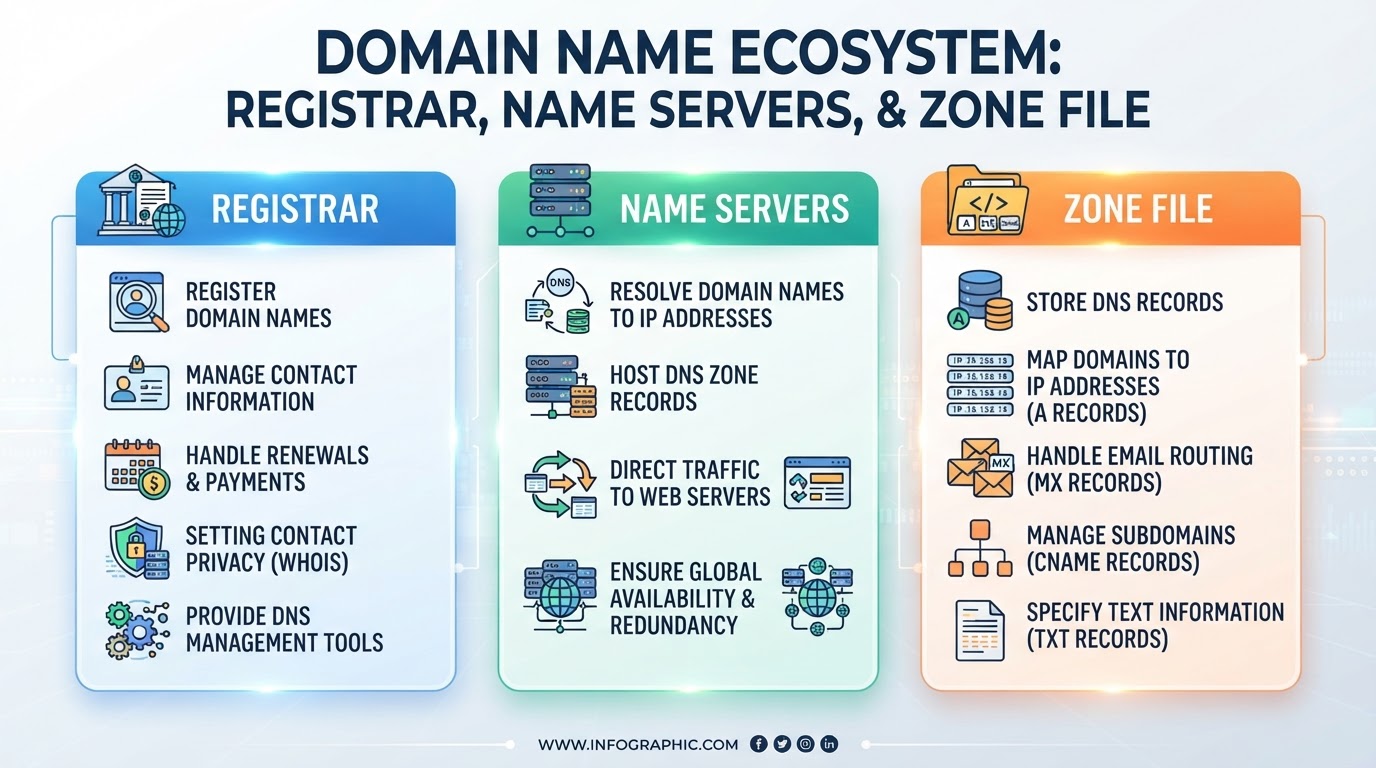
A domain name is the human-friendly address people type to reach you — `visionefx.net`, `google.com`, `virginia.gov`. Its job is simple: give the world something memorable to look up, so nobody has to memorize a string of numbers.
Domains read from right to left, from general to specific:
- Top-level domain (TLD): the ending — `.com`, `.net`, `.org`, `.gov`, or one of hundreds of newer options like `.agency` and `.dentist`. Each TLD is operated by a registry (Verisign runs `.com`, for example) under the oversight of ICANN, the nonprofit that coordinates the global naming system. \[EXTERNAL LINK: ICANN’s domain name registrant education resources]
- Second-level domain: the name you actually choose — the `visionefx` in `visionefx.net`. This is the part you register.
- Subdomain (optional): a prefix you control for free once you own the domain — `www.`, `shop.`, `blog.`. In the city analogy, subdomains are departments inside the same business; you can create as many as you like without registering anything new.
A domain name by itself does nothing. It’s a name in a directory with no listings yet — no building, no mail delivery, nothing. That comes later.
2. Domain Registration: Your Lease on the Name
Here’s something that surprises many business owners: you never truly buy a domain name. You lease it.
Registration reserves your exclusive right to a name for a set term — one to ten years at a time — recorded with the TLD’s registry. You handle the paperwork through a registrar, the ICANN-accredited “leasing agent”: GoDaddy, Namecheap, Cloudflare, and many others. The registrar files your claim with the registry, collects the annual fee, and gives you a control panel to manage everything.
As long as you keep renewing, the name is yours, and nobody else can take it. Stop renewing, and the lease lapses — with real consequences:
- Expiration and grace period. For a short window (length varies by registrar), you can usually renew at the normal price. Your site and email may already be offline.
- Redemption period. For roughly the next 30 days, you can typically still recover the name—but with a hefty redemption fee, often $80–$150 or more on top of renewal.
- Release. After that, the name goes back to the open market, where automated “drop-catching” services often grab valuable domains within seconds—sometimes to resell them to the original owner at a painful markup.
We’ve been called in more than once to help a business whose domain expired because renewal notices were going to a former employee’s inbox. It’s an expensive, sometimes unfixable mistake. A few habits prevent it entirely:
- Turn on auto-renew and keep a current credit card on file.
- Keep the account’s contact email on a different domain (for instance, a Gmail address). If your domain goes down, renewal warnings sent to an address on that domain go down with it.
- Register for multiple years on names that matter.
- Enable two-factor authentication and the registrar’s transfer lock. Your registrar login controls your business name, your website’s reachability, and your email routing. Treat it as the single most important password your company has.
- Use WHOIS/domain privacy (usually free now) to keep your personal contact details out of the public record — and out of spammers’ hands.
One more registration fact worth knowing: domains are portable. With an unlock and an authorization (EPP) code, you can transfer a domain from one registrar to another — like changing leasing agents while keeping the same business name. The website doesn’t move; only the paperwork does.
3. Name Servers: The Directory Office That Answers for You
So the world knows the name is yours. But when a customer looks it up, who actually answers?
That’s the job of your name servers. In the analogy, the county records office (registry) doesn’t keep your detailed listings itself. It keeps exactly one note next to your name — “for directions, ask this directory office” — and points to two or more name servers, usually written like:
ns1.examplehost.com
ns2.examplehost.com
This hand-off is called delegation, and it leads to the most misunderstood fact in this entire subject: whoever runs your name servers controls where your domain points — regardless of where the domain is registered. You can register your domain at GoDaddy while its name servers sit at Cloudflare or your hosting company. In that case, editing DNS inside GoDaddy changes nothing; the listings live at the directory office on record, not the leasing agent’s desk.
Practical implications:
-
- Changing name servers is the master switch. It moves all of your listings — website, email, verifications — to whatever the new servers say. If the new provider’s records aren’t set up completely first, things break. This is the #1 cause of “we switched hosts and our email died” (more on that below).
- Changes aren’t instant. Directory answers are cached (“photocopied”) all over the internet for a set time called TTL — time to live. Ordinary record edits usually show up within minutes to a few hours, honoring your TTL. Name-server changes can take longer — up to 24–48 hours in the worst case — because the registry’s own pointers are cached too. Pro tip: before any planned move, lower your TTLs a day ahead so the internet checks back for fresh directions more often.
4. The DNS Zone File: The Listings Themselves
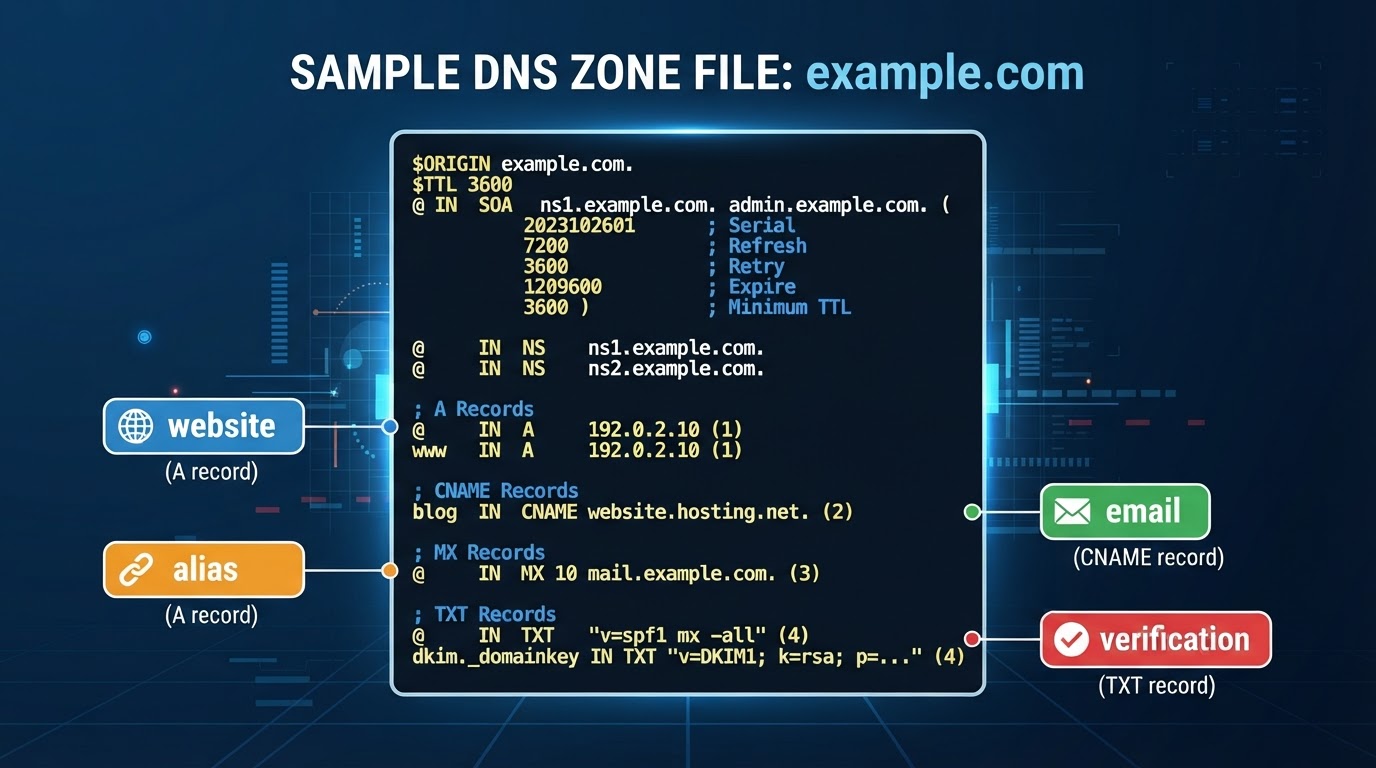
Finally, the page of listings the directory office keeps for your name: the zone file. It lives on your name servers, and it’s just a structured list of records — each one answering a different kind of question about your domain.
| Record | Question it answers | In the analogy |
|---|---|---|
| A | “Where’s the website?” → an IPv4 address | Foot traffic: go to this street address |
| AAAA | Same, for newer IPv6 addresses | Same listing, new address format |
| CNAME | “This name is an alias for that name” | “Also known as” — www usually points to the bare domain |
| MX | “Where does email get delivered?” (with priority numbers — lower wins) | Mail and packages: deliver to this dock first |
| TXT | Verification and email authentication (SPF, DKIM, DMARC) | Notarized notices posted on the wall proving identity |
| NS | “Which name servers answer for this zone?” | The directory office on record |
| SOA | Administrative details about the zone itself | The cover page of your listings |
| SRV | Locations for specific services (VoIP, chat) | Special-purpose departments |
| CAA | “Which authorities may issue SSL certificates for this name?” | Approved locksmiths list |
Here’s a simplified zone file, so the format holds no mystery:
$TTL 3600
@ IN SOA ns1.examplehost.com. admin.example.com. (
2026091201 ; serial
7200 3600 1209600 3600 )
@ IN NS ns1.examplehost.com.
@ IN NS ns2.examplehost.com.
@ IN A 203.0.113.42
www IN CNAME example.com.
@ IN MX 10 mail.examplehost.com.
@ IN TXT “v=spf1 include:\_spf.examplehost.com \~all”
Eight lines, and they route your entire online presence: website visitors to one address, email to another, plus a posted notice (that SPF record) telling the world’s mail servers which senders are legitimate for your domain.
Why email breaks when websites move
Now the classic disaster makes sense. Your website and your email are separate listings in the same directory. When a business changes hosts, one of two things typically goes wrong:
-
-
-
- Someone updates the A record (website listing) but rebuilds the zone without the old MX and TXT records — the mail listings vanish; or
- Someone flips the name servers to the new host, whose fresh zone file has default records and no knowledge of where your email actually lives (Microsoft 365, Google Workspace, etc.).
-
-
Either way, the website looks fine while email silently bounces — and missing SPF/DKIM/DMARC records quietly wreck deliverability even when mail does flow. The rule we follow on every migration: copy the complete zone file first, and carry every mail-related record forward before touching name servers.
How a Web Page Actually Loads: The Ten-Second Version
Put it all together and here’s what happens in the milliseconds after someone types your domain:
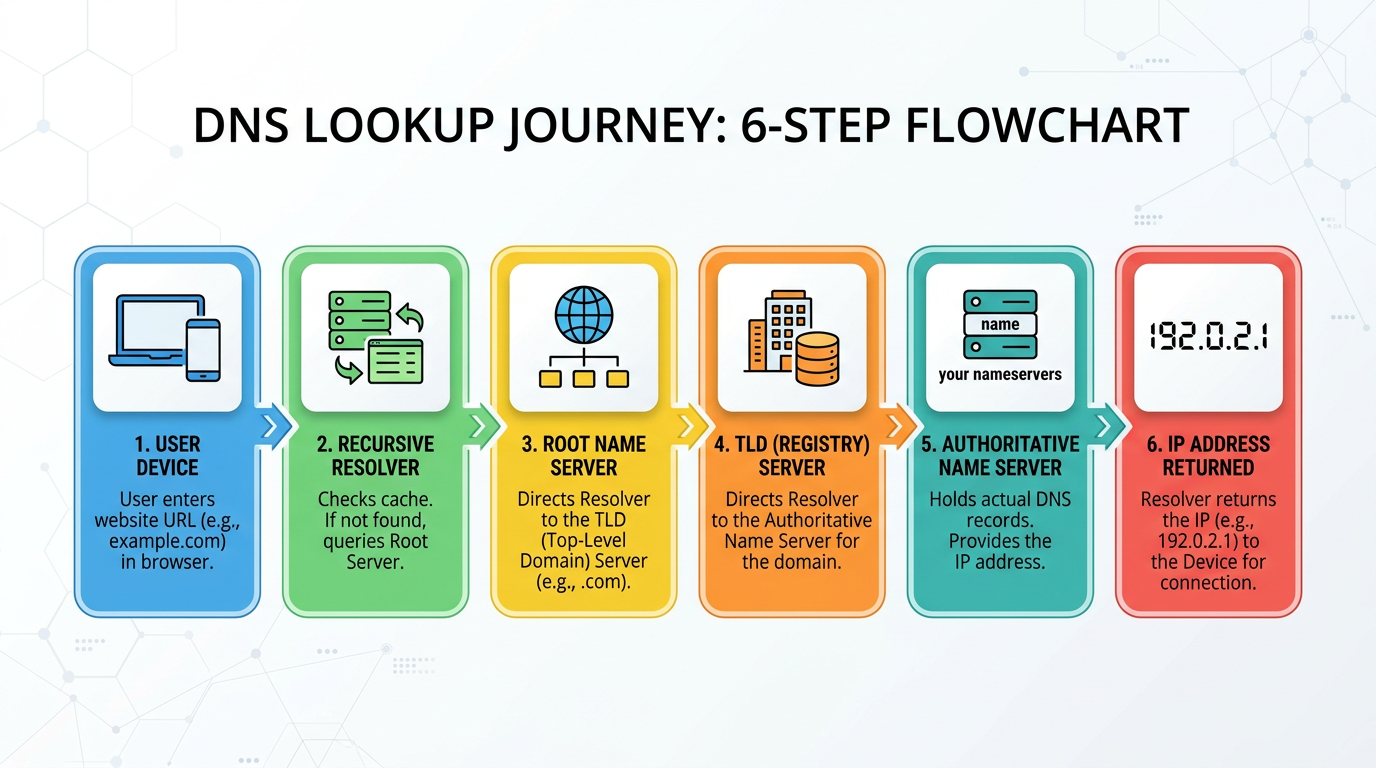
1. The visitor’s device asks a resolver (usually run by their ISP or a service like Google’s 8.8.8.8): “Where is `example.com`?”
2. The resolver asks the root servers, which point it to the `.com` registry’s servers.
3. The registry’s servers answer with the note on file: “Ask `ns1.examplehost.com`” — your name servers.
4. Your name server checks the zone file and replies with the A record: `203.0.113.42`.
5. The browser connects to that IP — the building — and your website loads.
6. The resolver caches the answer for the TTL, so repeat lookups skip most of these steps.
Name → directory → listing → address → building. Every website on Earth, every time.
Who Controls What: The Cheat Sheet
When something needs to change, the fastest path is knowing where that change happens:
| You need to… | Where it happens |
|---|---|
| Renew the domain, update billing, enable privacy | Registrar account |
| Transfer the domain to a new registrar | Registrar (unlock + EPP code) |
| Change which company controls your DNS | Name servers (set at the registrar) |
| Point the website to a new host | A record, in the zone file |
| Move email to Google Workspace / Microsoft 365 | MX + TXT records, in the zone file |
| Verify your domain with Google, Meta, etc. | TXT record, in the zone file |
Add a subdomain like shop. or blog. |
A or CNAME record, in the zone file |
And one piece of housekeeping worth more than everything above: keep a one-page document listing your registrar, your DNS provider, your host, and who holds each login. When a domain emergency hits, the businesses that recover in an hour instead of a week are the ones who know exactly where their four pieces live.
Frequently Asked Questions
Do I own my domain name permanently?
No — domains are registered in renewable terms of one to ten years, more like a lease than a purchase. As long as you renew on time, your exclusive rights continue indefinitely. If registration lapses, the name eventually returns to the open market where anyone can claim it.
What’s the difference between my domain registrar and my web host?
Your registrar manages the name — registration, renewal, and ownership records. Your web host provides the server where your website’s files live. They’re often different companies, and your domain’s name servers decide how the two connect. Bundling them with one provider is convenient but not required.
Why do DNS changes take 24–48 hours?
Because DNS answers are cached worldwide for a duration you set, called TTL, most record edits appear within minutes to a few hours; the 24–48 hour figure is the worst case, mainly for name-server changes. Lowering TTL values before a planned migration makes changes take effect faster.
Will changing web hosts break my email?
Only if the DNS records that route your email — MX and the TXT records used for SPF, DKIM, and DMARC — aren’t carried over to the new configuration. Website records and email records are independent. Copy the full zone file before any migration and recreate every mail record before switching name servers.
What happens if my domain registration expires?
Your website and email typically stop working almost immediately. Most registrars offer a short grace period to renew at the normal price, then a redemption period with a substantial recovery fee, and finally the domain is released to the public — where valuable names are often snapped up within seconds.
The Bottom Line
Your online presence rests on four pieces: a name people remember, a lease that keeps it yours, a directory office that answers for it, and a page of listings that routes visitors and email to the right places. None of it is complicated — it’s just invisible until the day it breaks.
Since 2000, VISIONEFX has registered, managed, and untangled domains and DNS for businesses across Virginia and beyond — alongside the “web design” and “hosting services” those domains point to. If your domain records are a mystery, or you’re planning a migration and want it done without a single bounced email, “talk to our team.” We’ll make sure all four pieces are exactly where they should be.
References:
Registrant Educational Materials
What is Domain Name?
What is a registrar?
How do I renew my domain name?
What if I forget to renew my domain name?